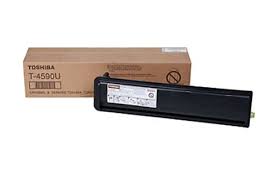
✔ Toner Color: Black
✔ Cartridge Type: Toner (Laser printer)
✔ Page Yield: Approximately 20,000 pages (based on 5% coverage, varies with usage and print settings)Toshiba T4590 Black Toner
✔ Compatible Printers: Specifically designed for Toshiba e-STUDIO 356, e-STUDIO 357, and other compatible Toshiba laser printers
✔ Toner Technology: Provides crisp, high-quality prints with sharp black text, ideal for high-volume office printing and professional documents
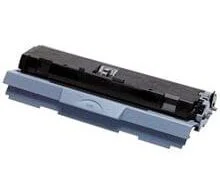
✔ OEM & Compatible Versions: Available in both original Toshiba and affordable third-party compatible versions Toshiba T4590 Black Toner
he T4590 Black Toner is fully compatible with the following Toshiba E‑Studio 356 series models:
-
Toshiba E‑Studio 356
-
Toshiba E‑Studio 356A
-
Toshiba E‑Studio 356P
Using the correct toner is essential for maintaining print quality and avoiding error messages or printer malfunctions. Third-party or compatible cartridges are often built to the same specifications as the OEM T4590, ensuring fit and functionality.
Genuine Toshiba T4590 Black Toner
-
Pros:
-
Guaranteed compatibility with all E‑Studio 356 printers
-
Consistent, high-quality black prints
-
Full page yield with no risk of leaks or malfunctions
-
Cons:
Compatible / Third-Party Toner
-
Pros:
-
Lower upfront cost, often 30–50% cheaper than OEM
-
Similar page yield and performance for everyday office printing
-
Cons:
Choosing between genuine and compatible toner depends on budget, printing volume, and the importance of guaranteed quality. For high-volume printing or critical documents, genuine toner is often recommended.
Performance and Yield
The T4590 black toner is rated for approximately 18,000 pages at 5% coverage, which is a standard measurement for office documents. This high yield makes it a cost-effective solution for medium to large offices, where frequent printing is required.
The toner uses high-quality black powder, ensuring:
-
Sharp text for professional documents
-
Consistent density across all pages
-
Minimal risk of streaks or smudges
-
Installation Tips
-
Power Off Printer: Always turn off the printer before replacing the cartridge.
-
Open the Toner Compartment: Slide out the used T4590 toner carefully.
-
Remove Protective Seals: Ensure any protective tape or seals are removed from the new cartridge.
-
Insert Correctly: Slide the new toner into place until it clicks securely.
-
Run Printer Calibration: After installation, run a test print or calibration to ensure optimal quality.
-
Storage: Keep spare cartridges in a cool, dry place to maintain toner integrity.
💡 Tips for Best Results
-
Use High-Quality Paper: Even the best toner may underperform on low-quality paper.
-
Regular Maintenance: Clean the printer periodically to avoid dust and toner buildup.
-
Avoid Mixing Toners: Always replace with the same model to prevent errors or damage.
Summary
The Toshiba T4590 Black Toner is a reliable, high-yield solution for the E‑Studio 356 series, delivering professional-quality black prints consistently. Available in genuine and compatible options, it offers flexibility in balancing cost and reliability. Proper installation and maintenance ensure long-lasting performance and help maintain the printer’s efficiency.
-
OEM Option: Guaranteed quality and performance
-
Compatible Option: Cost-effective alternative with similar results
-
Page Yield: ~18,000 pages at 5% coverage
-
Ideal Use: Offices, schools, and professional printing environments
Using the correct toner ensures your Toshiba E‑Studio 356 continues to provide clear, crisp, and reliable prints for all your important documents.
Would you like assistance in finding the best compatible toner for your printer model?


Reviews
There are no reviews yet.